Posts

LinkedIn

Subscribing to Salesforce Platform Events using External Java Client - CometD
Image
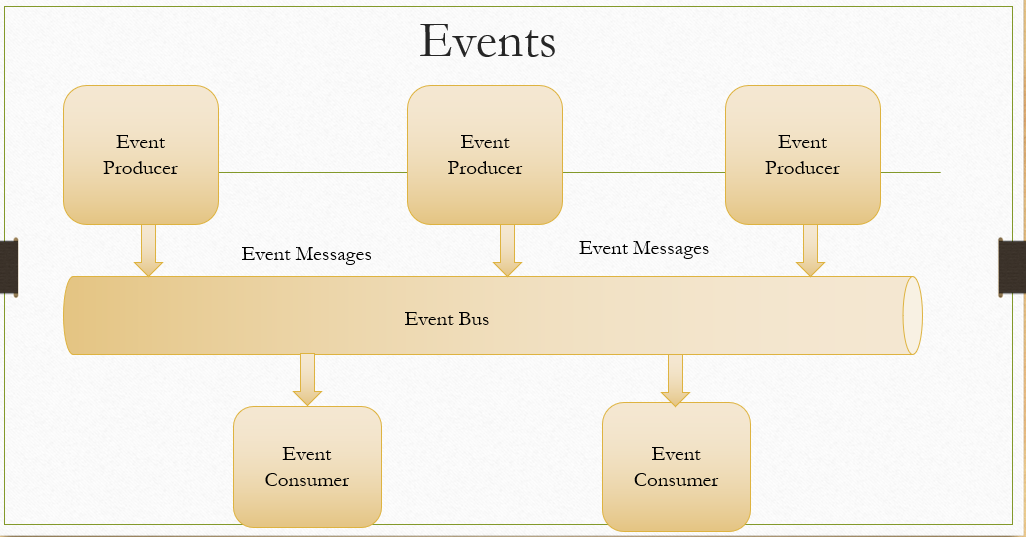
Platform Events follow event based Architecture, where multiple subscribers can subscribe to a published event in real time manner.  Below diagram shows the basic Architecture of the event-based communication Model: Event - This is a change in state for a business process Event Message - Data about the event Producer - Publisher of the event Event Bus - A communication and storage service for published events Event Consumer - A subscriber to the channel Platform events can be subscribed internally and also externally Platfrom events  - Internal Subscription Below are some scenarios in which you can consume platform events internally: 1. When we need to execute functionalities asynchronously to save govornor limits 2. To build a proper exception logging framework - You can find more details here  How to subscribe Internally? we can see more details about this in a different blogpost. Platfrom events  - External Consumption Many Organizations are moving to event-bas...

Integration using Salesforce Connect - Part 1 - Cross Org Adapter

Image
 When we want to access data stored in an external system -  to display, search, or modify within Salesforce, Salesforce Connect is one of the solution options. In the Developer edition, by default, you will have one license available. But for other orgs you need to purchase a license. You can use Salesforce Connect to retrieve data from different types of endpoints: 1. Another Salesforce Org 2. File Connect - To connect to Google Drive, SharePoint site etc. 3.  OData supported Services 4. Simple URL - If chatter is enabled, Salesforce can access another website to display details in Files Tab and Feed Salesforce Connect is based on 2 key features: 1. External Data Source Here you are defining details of the service you are going to connect, authentication type, which salesforce connect adaptor we are going to utilize etc. 2. External Object Once the connection is established with an external endpoint, we can sync objects/tables available in the External system to Salesfo...

Integration using Salesforce connect - Part 2 - OData Adaptor

Image
 In the previous post, we saw how to implement a cross org adaptor using Salesforce connect. Let us see how to make use of OData Adaptor now. What is OData? OData(Open Data Protocol) simplified RESTful API consumption, defining easy approaches to access data. Details can be found here . Salesforce Support OData 2.0(XML and JSON) and 4.0(Mainly JSON) format. This Trailhead module gives details about how you can utilize OData to set up External objects.  Setting up connection using OData protocol is same as what we have done for cross org adaptor 1. Create External Data Source First, we need to define or select type as shown below: Then Define/set parameters for this data source. Each parameter details are explained below: For our current connect we can choose like below: Finally choose Authentication approach: We have 3 options: 1. Anonymous 2. per user - we define an authentication mechanism for each user 3. Named Principal - Single credential for all users who access this se...

Integration Using Salesforce Connect - Part 3 - Considerations

Image
 In the previous 2 posts, we saw how we can use different adaptors to access and display data from an external system using Salesforce connect. Let us see some additional considerations on, when we can select Salesforce Connect as an integration Option. Usually when we need to frequently display or modify data from an external system in Salesforce, but you don't want to store that in Salesforce, Salesforce connect is a good Integration option. But consider the below factors before you make your Integration option as Salesforce Connect. 1. Salesforce Connect - License Considerations Salesforce Connect is an Add-on license. Based on the Salesforce documentation, if we purchase 1 license the usage is like below: That means: You can use one license in 1 org only If you want to connect to a different non-salesforce data source, you need to purchase an additional license You can connect up to 5 different Salesforce org using a single license 2. Salesforce Connect - Rate Limits 3. Handli...

Salesforce REST API - Usage of Search and parameterized Search

Image
There can be scenarios where an external system would like to perform a search in salesforce with multiple objects. Recently we got a requirement to search for memberid in both Lead and opportunity and return resulted records. You can execute this in two ways. 1. Execute as 2 separate API SOQL query execution - one for Lead and one for Opportunity.  2. Execute Search through REST API The problem with the first approach is that you have to execute it as 2 separate transactions and it is time-consuming. To avoid that we can execute this using REST API search mechanism also.  Search can be executed through REST using 2 approaches: 1. SOSL based Search 2. Parameterized Search Let us see both in detail. 1. SOSL Based REST API You can pass URL encoded text in SOSL query as a parameter and this will return details that match the search criteria. Please find the details of executing SOSL through REST below: Let us see how we can execute the above-mentioned search scenario. I am using...